


From Meme to Stitch: Viral Trend Embroidery on Hoody

By diver361
- 6 views
- View diver361's images
Viral Trend Embroidery on Hoodies: How Internet Symbols Become Wearable Icons 🔥🧵
Every few months the internet creates a new visual language — a symbol, a number, a phrase that suddenly appears everywhere. One of the clearest examples of this phenomenon is the Viral Six Seven (67) trend: abstract, numeric, slightly absurd, and instantly recognizable to those “in the know”.
When such trends move from screens to fabric, embroidery becomes the most powerful medium. A stitched hoodie feels permanent, intentional, and collectible — unlike a fleeting printed meme.
In this systematic study, we’ll explore:
What you need to know about embroidering trend-based hoodies
The technical challenges of embroidery on hoodies
How to recognize and choose a real trend
What the Viral Six Seven trend actually is
How long such trends usually live
The most promising embroidery trends heading into 2026
Practical advice from sellers and designers (highlighted blocks)
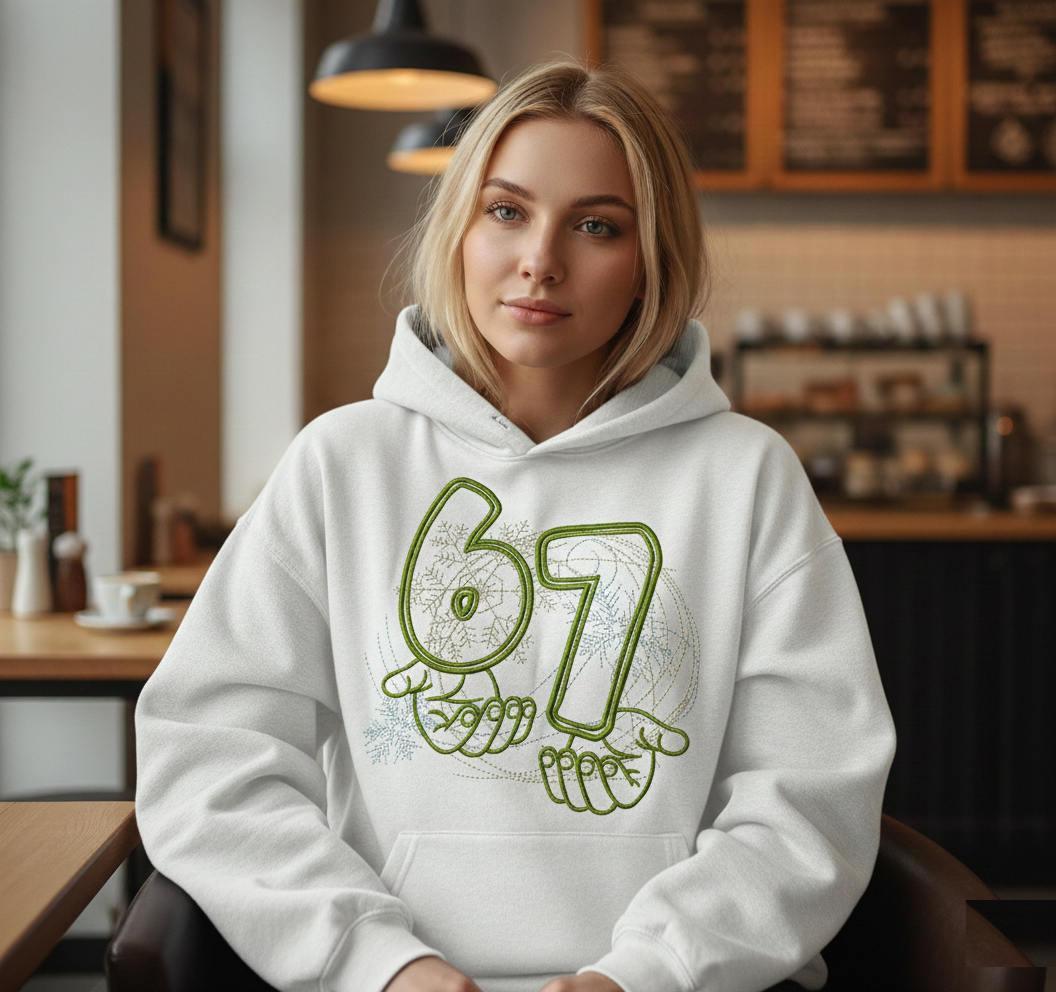
As a reference, we’ll use this example:
✨ Viral Six Seven Meme embroidery design
1. What Is the “Viral Six Seven” Trend? 🧠📈
The Six Seven (67) trend belongs to a new generation of internet symbols:
Numbers instead of words
Abstract meaning instead of direct explanation
Visual repetition across TikTok, Instagram, Discord, Reddit
Meme logic: “If you know, you know”
It works because it feels:
Slightly cryptic
Minimal
Shareable
Detached from language barriers
On hoodies, “67” becomes a badge of internet awareness, not just decoration.
DESIGNER TIP: Trendy symbols work best when they are visually simple but conceptually loaded. Numbers, icons, and outlines outperform detailed illustrations.
2. What You Must Know About Trend Embroidery on Hoodies 👕⚠️
Trendy designs come with extra pressure:
They must look good now
But still feel wearable later
Key hoodie embroidery realities:
Hoodies stretch → embroidery must compensate
Thick fleece absorbs stitches
Trends favor clean, bold shapes
Any distortion ruins the “cool factor”
This makes technical discipline essential.
3. The Most Difficult Moments When Embroidering Trend Hoodies 🧵⚙️
A. Line Precision
Trendy motifs often rely on thin outlines and typography.
Solution:
Strong underlay
Satin or bean stitch with controlled density
Avoid ultra-thin running stitches
B. Fabric Stretch
Oversized hoodies exaggerate distortion.
Solution:
Cut-away stabilizer (always)
Float technique instead of aggressive hooping
C. Scale Balance
Too small → meme disappears
Too large → looks forced
Solution:
Embroidery width = 30–40% of chest width
For numbers like “67”: usually 18–24 cm
SELLER TIP: Trends fail fastest when embroidery is undersized. If the symbol isn’t readable from 2 meters away, it won’t sell.
4. Materials Needed for Trendy Hoodie Embroidery 🧵📦
Base Hoodie
Cotton or cotton/poly blend (70/30 or 80/20)
Medium–heavy weight (280–350 gsm)
Smooth outer surface
Stabilizers
Mandatory: cut-away stabilizer
Optional: water-soluble topper for clean outlines
Threads
Polyester or rayon
Neutral or muted colors (white, olive, beige, black)
Avoid metallics for trends — they age badly
5. How to Choose a Trendy Motif (Before It’s Too Late) ⏳🔥
A real trend suitable for embroidery usually has:
✅ Strong repetition across platforms
✅ Visual simplicity
✅ Adaptability to fashion
✅ No long explanatory text
✅ Emotional or ironic tone
Six Seven qualifies because it:
Is language-neutral
Works as typography
Feels minimal but loaded
Can evolve into variations
DESIGNER TIP: If a trend needs explanation, it won’t survive embroidery. Stitches must speak instantly. </div>
6. How Long Do Trends Like “Six Seven” Live? ⏱️
Trend lifespan (average):
Online meme: 3–6 months
Fashion adaptation: 6–18 months
Embroidered version: up to 24 months
Why embroidery lasts longer:
Feels intentional
Filters out low-effort copies
Appeals to collectors, not impulse buyers
7. Trending Embroidery Motifs to Watch for 2026 🔮🧵
Based on online pattern growth and fashion signals:
Top Embroidery-Friendly Trends
Abstract numbers & dates
Pseudo-technical diagrams
Minimal hands / gestures
Urban symbols (maps, grids, coordinates)
“Anti-meaning” typography
Nostalgic internet references (early meme culture)
These trends translate well into clean stitch language.
SELLER TIP: Limited runs work best for trends. Scarcity protects value when the trend eventually fades.
8. What Similar Products Online Reveal 🔍
Research shows:
Trend hoodies sell best in neutral colors
Embroidery beats print in perceived value
Lifestyle photos outperform flat product shots
Buyers want subtle “insider” symbols, not loud jokes
The Viral Six Seven design fits perfectly into this pattern.
Final Thoughts: Stitching the Internet Into Fabric 🌐🧵
Trend embroidery is about timing — but also about restraint. The best trendy hoodies don’t scream “viral”. They whisper it.
By choosing:
the right trend,
the right scale,
and disciplined embroidery technique,
you turn fleeting internet moments into wearable artifacts of digital culture.
Recommended Comments
Join the conversation
You can post now and register later. If you have an account, sign in now to post with your account.