


Carrying Stories in Thread: Embroidery on Cotton Tote Bags

By diver361
- 588 views
- View diver361's images
👜✨ Embroidery on Cotton Tote Bags: A Complete Research-Style Guide
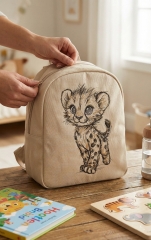
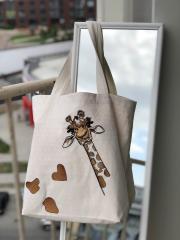
Cotton tote bags have become icons of everyday style — eco-friendly, reusable, and perfect canvases for embroidery. From book lovers to fashion brands, embroidered cotton bags combine function, emotion, and craftsmanship. Let’s explore the process systematically, from fabric to final stitch 🧵
🔬 1. Why Cotton Tote Bags Are Ideal for Embroidery
Cotton is one of the most embroidery-friendly materials because it offers:
✔️ Natural fiber with good stitch hold
✔️ Stable surface (especially canvas & twill)
✔️ Easy hooping
✔️ Long-term durability
💡 Canvas cotton (8–12 oz) is the gold standard for embroidered tote bags.
🧵 2. Step-by-Step Tote Bag Manufacturing Process
📐 Step 1: Choosing the Bag
Flat tote or gusseted tote
Long or short handles
Pre-washed vs raw cotton
🪡 Step 2: Preparing for Embroidery
Press the bag (wrinkles = distortion)
Decide embroidery placement (center / upper third)
🧷 Step 3: Hooping & Stabilizing
Use magnetic or flat hoop when possible
Secure handles away from needle path
🧶 Step 4: Embroidery
Medium density designs work best
Avoid extreme stitch counts for thin cotton
🧼 Step 5: Finishing
Remove stabilizer
Steam lightly
Final quality check
📏 3. Most Popular Tote Bag Sizes (Industry Standard)
Use Case | Bag Size (inches) |
|---|---|
Daily shopping | 15″ × 16″ |
Books & study | 14″ × 18″ |
Fashion tote | 13″ × 15″ |
Promo / events | 12″ × 14″ |
🎯 Optimal embroidery size:
👉 4″ × 4″ to 6″ × 8″
🧪 4. Choosing the Right Stabilizer (Critical!)
✔️ Tear-Away (Most Popular)
Medium weight
Easy removal
Perfect for flat cotton
✔️ Cut-Away (For Dense Designs)
For high stitch count
Keeps shape long-term
❌ Avoid:
Wash-away (too weak)
Heavy cut-away (bag loses flexibility)
🧵 SELLER TIP
“Customers love tote bags that stay soft. Over-stabilizing kills the feel — choose the lightest option that still holds the design.”
🎨 5. Design Considerations for Cotton Bags
The best designs for totes are:
Line art
Sketch-style illustrations
Nature & animal motifs
Minimalist characters
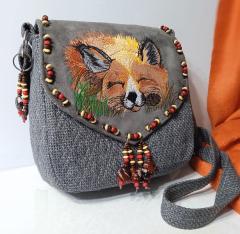
🦊 A perfect example is the
Fox with glasses embroidery design
It combines:
Clean outlines
Moderate stitch density
High visual charm 😍
🎨 DESIGNER INSIGHT
“Think like a fashion illustrator, not a logo designer. Tote embroidery should feel hand-drawn and emotional.”
⚠️ 6. Common Mistakes (and How to Avoid Them)
❌ Too dense designs → stiff bag
❌ Wrong stabilizer → puckering
❌ Embroidering too low → hidden by folds
✅ Always test on scrap cotton
✅ Keep embroidery above center
✅ Use sharp needle (75/11 or 80/12)
🧠 EXPERT ADVICE
“If the bag doesn’t look good hanging on a shoulder, redesign the placement — not the embroidery.”
🌱 7. Why Embroidered Cotton Bags Sell So Well
♻️ Eco-friendly appeal
🎁 Perfect gift item
👜 Fashion + function
❤️ Emotional connection through illustration
✨ Embroidery turns a simple cotton bag into a story you can carry.
🧵 Final Thoughts
Embroidery on cotton tote bags is not just a technique —
it’s a blend of engineering, design, and emotion.
When done right:
The bag stays soft
The design stays crisp
The customer stays in love 💛
If you’re designing, selling, or stitching — this is one of the strongest products in modern embroidery.
Happy stitching! 🪡👜✨
Recommended Comments
Join the conversation
You can post now and register later. If you have an account, sign in now to post with your account.