Skip to content
View in the app

A better way to browse. Learn more.

Machine embroidery community

A full-screen app on your home screen with push notifications, badges and more.

To install this app on iOS and iPadOS
  1. Tap the Share icon in Safari
  2. Scroll the menu and tap Add to Home Screen.
  3. Tap Add in the top-right corner.
To install this app on Android
  1. Tap the 3-dot menu (โ‹ฎ) in the top-right corner of the browser.
  2. Tap Add to Home screen or Install app.
  3. Confirm by tapping Install.

2 Screenshots

๐Ÿ
๐ŸŽ Free Download

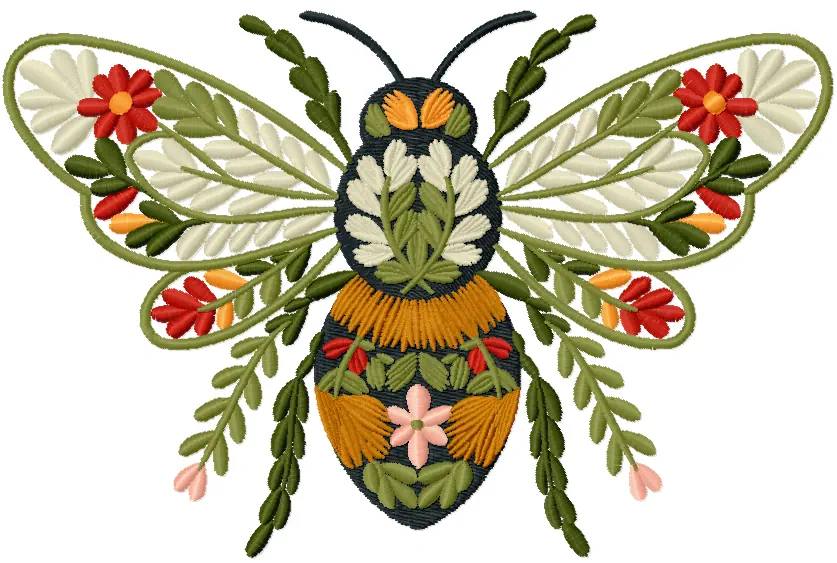
Floral Bee
free embroidery design

A bee transformed into a garden โ€” every wing, every stripe woven from leaves, daisy petals, red florals and delicate pink buds. Dense, lush, and completely free.

๐ŸŒฟ Botanical style ๐Ÿชก Fill + satin stitch โญ 5 sizes
Floral Bee free embroidery design
๐ŸŒฟ About the design

A bee that isn't a bee โ€” it's an entire garden in disguise. Wings filled with cream leaves and red daisies, a body layered in gold, olive and white botanicals. One of those designs you keep looking at.

๐Ÿชก Stitch technique

Dense satin fills on the body, open leaf stitching on the wings, fine stem-stitch outlines. Mediumโ€“high density โ€” works beautifully on dark fabrics like black linen and canvas.

โœ”๏ธ Perfect for

Black canvas bags ยท dark denim jackets ยท tote bags ยท backpacks ยท cushion covers ยท patch projects ยท linen pouches

๐Ÿ’ก Pro tip

On dark fabric the cream and white leaf fills glow โ€” this is one of those designs that looks dramatically better on black than on white. Try it on black linen first.

๐Ÿ“ Available sizes

Size Width ร— Height (inches) Width ร— Height (mm)
1 3.51 ร— 2.31โ€ณ 89 ร— 59 mm
2 5.51 ร— 2.96โ€ณ 140 ร— 75 mm
3 7.51 ร— 3.62โ€ณ 191 ร— 92 mm
4 6.51 ร— 4.28โ€ณ 165 ร— 109 mm
5 7.51 ร— 4.94โ€ณ 191 ร— 125 mm

๐Ÿ–ค This design on dark fabric

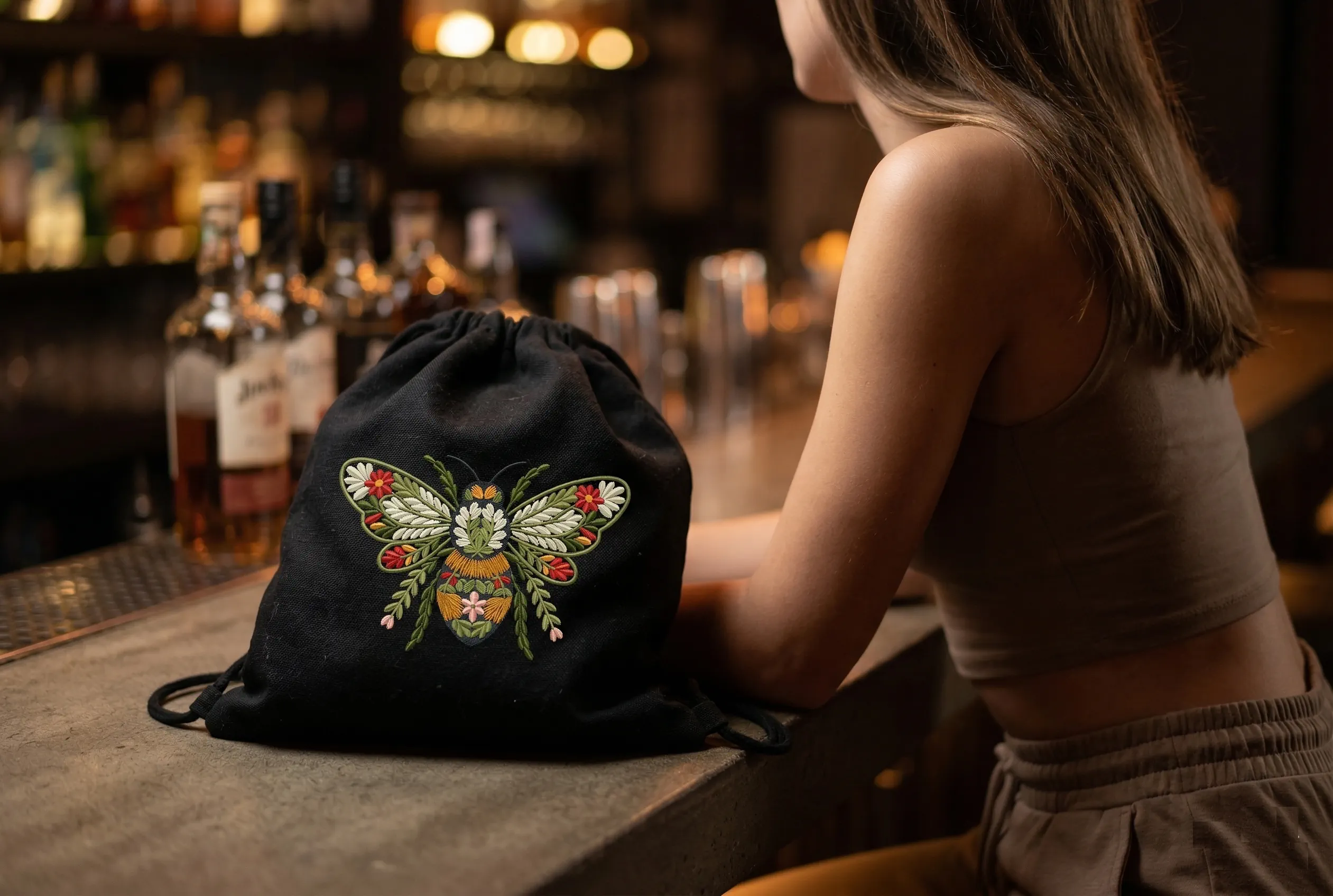
Floral bee embroidery on black canvas drawstring bag

On black canvas the design transforms completely โ€” the cream leaf fills illuminate like porcelain, the olive greens deepen, and the red daisies look hand-painted.

This is a design that doesn't just sit on the fabric โ€” it glows from it. A black drawstring bag becomes a statement piece. A dark denim jacket becomes a wearable garden.

๐Ÿชก Before you stitch

๐Ÿ’ก Stabilizer

Use a medium cut-away stabilizer โ€” this design has high density in the body area and needs firm backing. For dark fabrics add a water-soluble topping to prevent stitches sinking into the weave texture.

๐ŸŽจ Thread colors

The design palette: off-white / cream ยท olive green (2 shades) ยท dark charcoal ยท amber gold ยท deep red ยท coral orange ยท blush pink. Rayon 40wt gives the best sheen on leaf fills. Don't substitute polyester for the white fills โ€” it reads flat on dark fabric.

โš ๏ธ Needle & speed

Use a 75/11 sharp needle for canvas and linen. Run at 70โ€“80% speed โ€” the overlapping leaf shapes have many direction changes and the machine needs time to follow each cleanly. A rushed stitch on the wing fills will pucker the outline.

โœจ Color order matters

Stitch the wing leaf fills first, then the body fills, then the flowers, and the dark outlines absolutely last. The charcoal outline sits on top of every other element โ€” reverse the order and the layered botanical look collapses.

"

Nature doesn't separate the bee from the flower. Neither does this design. They are the same thing โ€” and that's what makes it extraordinary.

โ€” Embroideres Design Studio

Free download ๐ŸŽ Show us your stitched bee!

#FreeEmbroideryDesign #FloralBee #BotanicalEmbroidery #MachineEmbroidery #DarkFabricEmbroidery #BeeEmbroidery

User Feedback

Join the conversation

You can post now and register later. If you have an account, sign in now to post with your account.

Guest
  • This will not be shown to other users.

  • Your review Required
    Unfortunately, your content contains terms that we do not allow. Please edit your content to remove the highlighted words below.
    Add a review...

Account

Navigation

Search

Search

Configure browser push notifications

Chrome (Android)
  1. Tap the lock icon next to the address bar.
  2. Tap Permissions โ†’ Notifications.
  3. Adjust your preference.
Chrome (Desktop)
  1. Click the padlock icon in the address bar.
  2. Select Site settings.
  3. Find Notifications and adjust your preference.