



Oversized Truck Embroidery Hoodies: A Bold Gift Idea 🚛
- automotive hoodie embroidery
- big hoop embroidery tips
- custom trucker hoodie
- large hoop embroidery machine
- machine embroidery hoodie
- oversized embroidery design
- peterbilt art logo design
- peterbilt embroidery hoodie
- peterbilt logo hoodie
- truck driver gift hoodie
- truck embroidery design
- truck logo embroidery pattern

By diver361
- 306 views
- View diver361's images
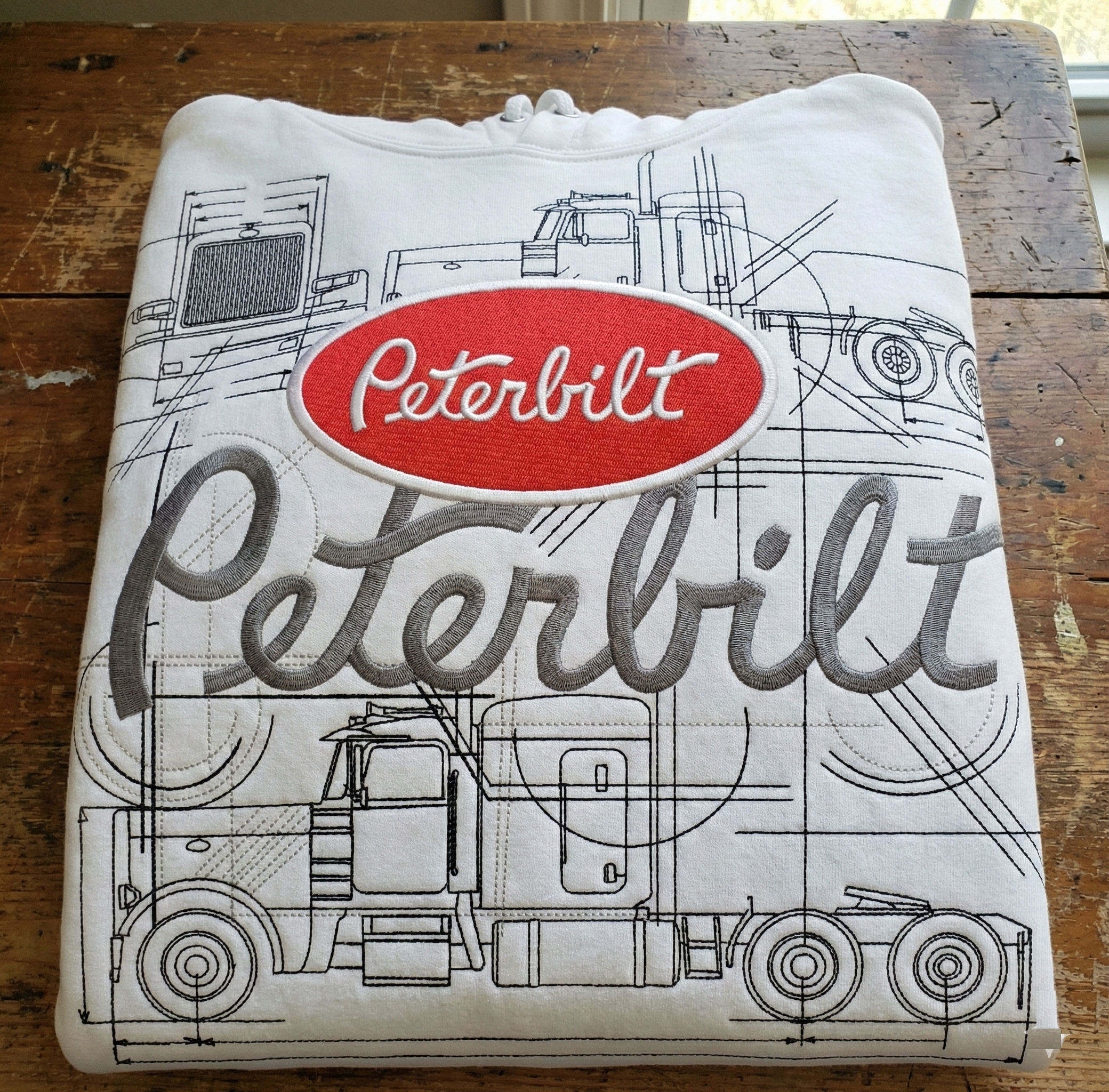
Big, Bold & Personal: Creating an Automotive Embroidered Hoodie for Your Trucker 🚛❤️
If your husband works on the road — long nights, endless highways, and thousands of miles — you know how much a thoughtful, personal gift can mean. Something warm, practical, and uniquely his.
So here’s an idea that always hits the heart and looks amazing:
👉 A hoodie with oversized automotive embroidery.
Not just a small logo.
Not a tiny badge.
But a full-front masterpiece that celebrates his pride, his rig, and his journey.
And yes — you can cover almost the entire hoodie using jumbo hoops like 200×400 mm, 200×450 mm, or even 200×500 mm on some machines. It’s bold, dramatic, and incredibly impressive when done correctly.
For inspiration, here’s a stunning design:
Peterbilt art logo embroidery design
Why Automotive Hoodie Embroidery Is So Popular
Men in trucking, construction, heavy-duty equipment, and auto restoration love apparel that reflects what they do. These hoodies:
✨ Boost pride in their work
✨ Feel personal and meaningful
✨ Make incredible birthday/Father’s Day/Christmas gifts
✨ Look stylish and rugged
✨ Last for years
For truckers especially, a hoodie is part of daily life — it keeps them warm on night shifts, rest stops, fuel stations, and long hauls.
Using the Entire Hoodie Area: Is It Possible?
Yes — but it comes with important rules.
Oversized embroidery (200×400+ mm) allows you to create a hoodie that looks almost like a custom commercial garment. It’s perfect for:
✔ Full front schematic embroidery
✔ Technical drawings of trucks
✔ Large vehicle silhouettes
✔ Brand-style logos
✔ Line-art and blueprint concepts
But you must be aware of a few challenges…
⚠ Problems When Using Very Large Hoop Sizes
Problem | Why It Happens | How to Fix |
|---|---|---|
Fabric stretching | Hoodies are thick knit fabric | Use cut-away stabilizer + basting |
Heavy stitch density | Big designs often use complex fills | Reduce density or use sketch-style designs |
Needle breaks | Thick layers + stabilizer | Use sharp 80/12 or 90/14 needles |
Design distortion | Too much pull on knit fabric | Hoop firmly + avoid floating |
Machine limits | Not all machines support 200×400 mm hoops | Check max embroidery area first |
Where to Place the Embroidery
Best placement for a BIG automotive design
✔ Center chest (full front) — most popular
✔ Back of the hoodie — large clean area
✔ Side panel (rare but artistic)
Avoid:
❌ Too close to seams
❌ Over pockets (distorts the design)
❌ Very high placement under the neck
Step-by-Step: How to Embroider an Automotive Hoodie
1️⃣ Choose the hoodie
Cotton/poly blend 50/50 is best
Medium to heavy weight
Smooth surface for crisp stitching
Avoid fabric with too much stretch
2️⃣ Prepare the design
Sketch-style automotive art is perfect because it uses:
Lower stitch density
Clean lines
Professional look
Less fabric distortion
3️⃣ Stabilize properly
Use medium or heavy cut-away stabilizer.
🧵 Recommended:
2 layers of cut-away
Temporary adhesive spray
Basting stitches around the design
4️⃣ Embroider slow and steady
Large designs must stitch slower:
600–700 spm max
Pause between color changes
Check tension frequently
5️⃣ Final finishing
Trim jump stitches carefully
Light steam from the back
Avoid pressing directly on the embroidery
Material Guide: What Hoodie Fabrics Work Best?
Fabric Type | Pros | Cons |
|---|---|---|
Cotton/Poly 50/50 | Durable, stable, soft, perfect for embroidery | May shrink slightly |
100% Cotton | Warm, breathable, natural feel | Stretch increases distortion |
Fleece Hoodie | Cozy, thick, long-lasting | Requires stronger stabilizer |
Thin Lightweight Hoodie | Minimal bulk, stylish | Not ideal for large embroidery |
Expert Tips – From Sellers & Designers
🧩 Designer Tip: Think Like a Blueprint Artist
“Large line-art designs are the safest for oversized hoodie embroidery — they look impressive without overwhelming the fabric.”
🧼 Seller Tip: Choose a Hoodie That Holds Up
“Cheap hoodies tear at the seams during hooping. Spend a little more for quality — it pays off.”
🧵 Embroiderer Tip: Stabilizer Is Everything
“Two layers of cut-away stabilizer prevent 90% of stretching problems with giant designs.”
Examples of Similar Embroidered Automotive Hoodies
You can find similar styles online, such as:
Kenworth blueprint hoodies
Volvo truck line-art hoodies
Mack truck embroidery
Freightliner schematic hoodies
Scania technical drawing designs
These all use the same idea: oversized sketch-style truck embroidery.
Why This Makes a Perfect Gift for Your Trucker ❤️
Because it’s:
💙 Personalized
💙 Useful
💙 High-quality
💙 Unique
💙 Emotional
And most importantly — it shows that you understand what he loves.
A hoodie like this becomes his favorite, worn everywhere:
On the job
During travel
At home
On weekends
At fuel stops
In the garage
Conclusion: Create Something He’ll Wear With Pride
A Peterbilt hoodie with a huge custom embroidered design is not just clothing — it’s a tribute to the long hours, hard work, and dedication of trucking life.
If you want a design that fills the front beautifully, here it is again:
Recommended Comments
Join the conversation
You can post now and register later. If you have an account, sign in now to post with your account.