

🌸 Embroidered Cotton Napkins: Secrets to Elegant Table Line

By diver361
- 307 views
- View diver361's images
🧵 Embroidery on Cotton Napkins: Hidden Pitfalls & Pro Tips
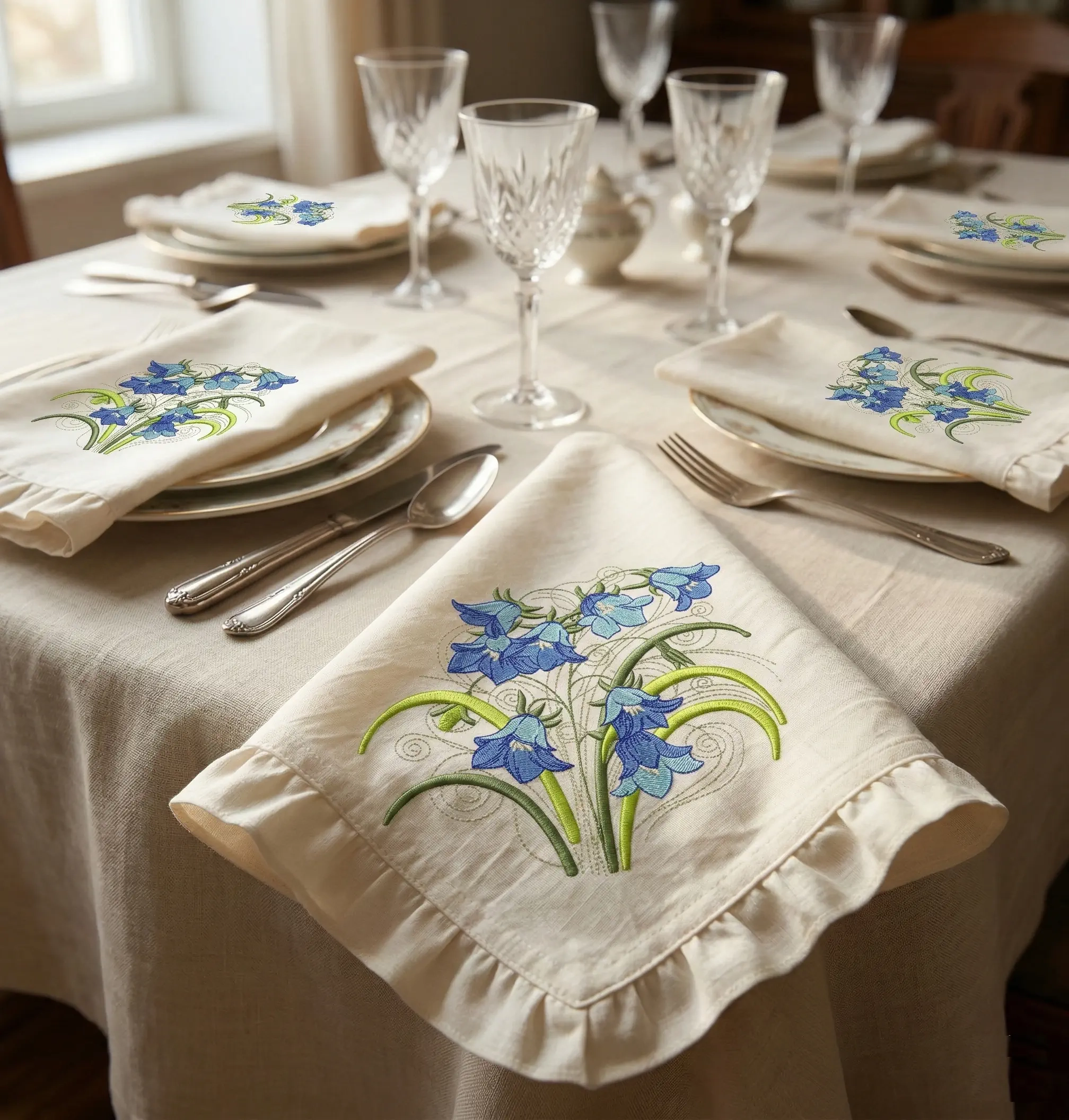
Beautiful embroidered napkins instantly elevate a table setting. Delicate floral motifs like the Bluebells bouquet add elegance, handmade charm, and a luxurious texture that guests immediately notice. But achieving a clean, premium result on cotton napkins requires attention to a few critical details.
Example design:
👉 Bluebells Flowers Bouquet Embroidery Design
https://embroideres.com/bluebells-flowers-bouquet-embroidery-design-79529/
🌿 What Can Go Wrong? (Hidden Pitfalls)
🪡 Fabric distortion
Cotton napkins are usually lightweight (120–180 g/m²). During embroidery the fabric can pull, wrinkle, or shift.
➡ Solution
✔ Use cut-away stabilizer or a dense tear-away
✔ Hoop carefully without stretching the napkin
🧵 Thread sinking into fabric
Fine cotton absorbs stitches and the embroidery can lose its sharpness.
➡ Solution
✔ Add water-soluble topper
✔ Increase satin density slightly
📏 Placement mistakes
Napkins must fold elegantly on a table. Poor placement can hide the embroidery completely.
➡ Best placement ideas:
• Corner embroidery (classic restaurant style)
• Lower corner with diagonal orientation
• Small motif near folded edge
Avoid placing designs in the center, where folds hide the work.
✨ How to Make Napkins Look Premium
🌸 Keep embroidery smaller
Large designs make napkins stiff.
✔ Ideal embroidery size
90–120 mm (3.5–4.7 in)
This keeps the napkin soft and elegant.
🧶 Choose the right threads
Experts recommend polyester embroidery thread for napkins.
✔ Resistant to washing
✔ Color stable
✔ Durable
🪡 Use soft underlay
Heavy underlay can create a stiff patch.
✔ Use light edge walk + zigzag underlay
💡 Expert Advice
🧵 Debbie Henry – Embroidery educator
“Napkins are handled constantly. Your embroidery must be elegant but also durable. Always test wash the sample.”
🧵 John Deer – Digitizing expert
“For lightweight cotton fabrics, reduce stitch density slightly and add topper. This preserves stitch definition.”
🧵 Lisa Shaw – Textile designer
“Small corner embroidery works best for table linens. It keeps the fabric flexible and visually balanced.”
🌼 Inspiration From Real Projects
Looking at popular embroidered table linen collections online, successful designs share common features:
✔ Small corner embroidery
✔ Soft floral motifs
✔ Natural cotton or linen
✔ Light pastel thread palette
✔ Elegant minimal composition
Designs like the Bluebells bouquet embroidery follow exactly this principle — delicate, balanced and perfect for table decor.
🍽 Styling Ideas for Embroidered Napkins
• Spring garden table settings
• Wedding reception décor
• Cottage-style dining
• Vintage tea party table
• Elegant brunch table
Paired with crystal glasses and neutral linens, embroidered napkins become the centerpiece of the table.
🌷 Final Tip
The difference between homemade embroidery and boutique-quality linens is not the design — it is:
✔ stabilizer choice
✔ stitch density
✔ placement
✔ thread quality
Master these details and your embroidered napkins will look luxurious and professional.
Recommended Comments
Join the conversation
You can post now and register later. If you have an account, sign in now to post with your account.